Best Streaming Camera for Gaming Setup 2026
Whether you're streaming on Twitch, creating YouTube content, or simply want to look professional in Discord calls, having the right camera is crucial for any modern gaming setup. In 2026, the streaming camera market offers incredible value with features that were considered premium just a few years ago.
This comprehensive guide covers the best streaming cameras across every budget range, from entry-level options for beginners to professional-grade cameras for serious content creators. We'll help you choose the perfect camera that matches your streaming goals and setup requirements.
Quick Comparison Table
| Camera | Resolution | FPS | Key Feature | Price Range | Best For |
|---|---|---|---|---|---|
| Logitech C920 | 1080p | 30 | Proven reliability | $60-80 | Budget streaming |
| Logitech C920S | 1080p | 30 | Privacy shutter | $70-90 | Privacy-conscious users |
| Razer Kiyo | 1080p | 30 | Built-in ring light | $80-120 | Low-light streaming |
| Razer Kiyo X | 1080p | 30/60 | Compact design | $70-100 | Space-limited setups |
| Razer Kiyo Pro | 1080p | 60 | HDR, adaptive light | $150-200 | Professional streaming |
Understanding Streaming Camera Basics
Resolution and Frame Rates
1080p 30fps: The sweet spot for most streamers. Provides clear image quality without overwhelming your internet bandwidth or computer processing power.
1080p 60fps: Ideal for high-motion gaming streams where smooth video matters. Requires more bandwidth and processing power.
4K support: Generally overkill for streaming since most platforms compress to 1080p anyway. Better to prioritize other features.
Key Features for Gaming Streamers
Low-light performance: Essential for late-night gaming sessions Auto-focus speed: Quickly adjusts when you move or gesture Field of view: Wider is better for showing gestures and reactions Audio quality: Built-in microphones vary widely in quality Compatibility: Should work seamlessly with OBS, Streamlabs, and XSplit
Top 5 Streaming Cameras for Gaming Setup 2026
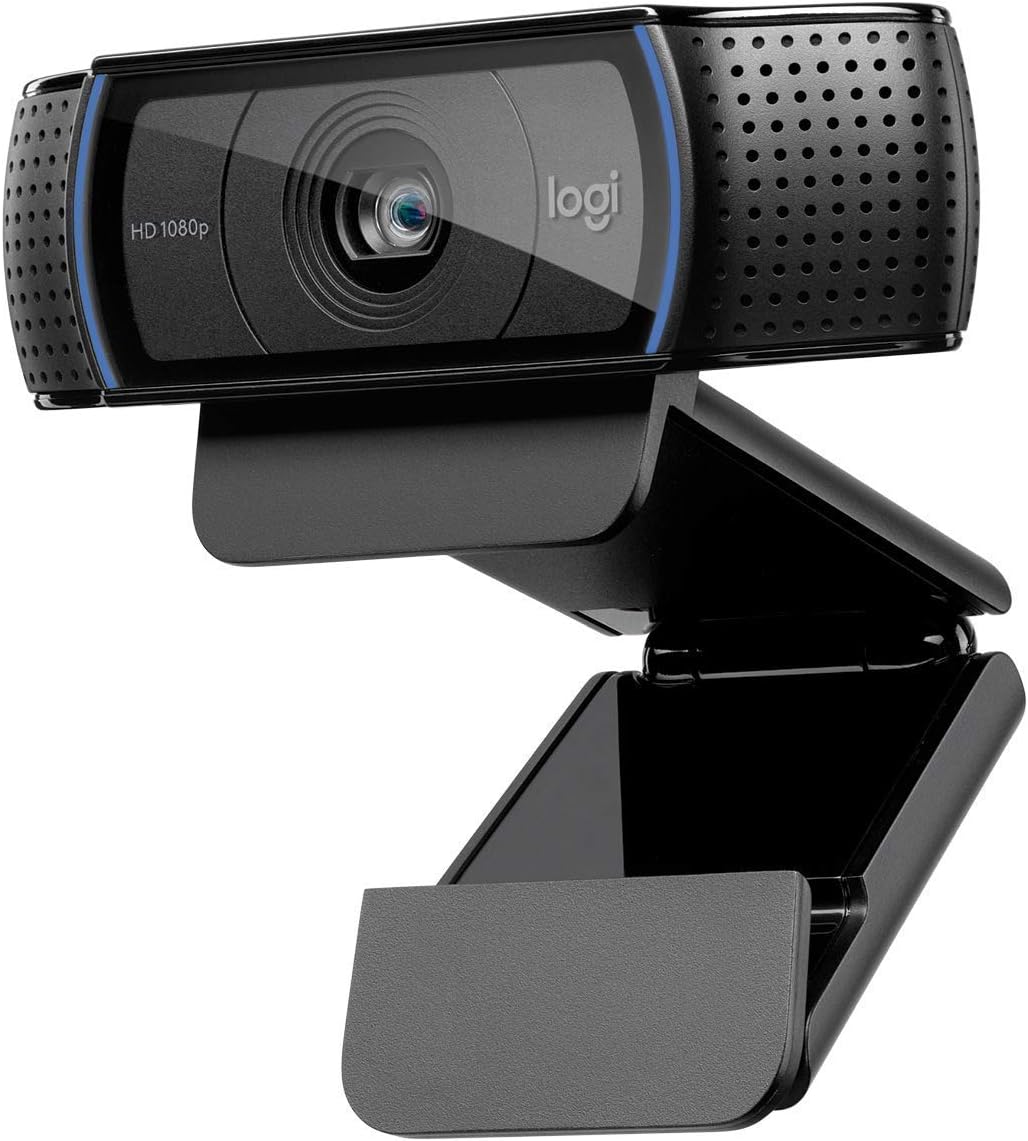
1. Logitech C920 HD Pro - Best Budget Choice
ASIN: B006JH8T3S - Amazon Link
The C920 has been the gold standard for budget streaming for years, and for good reason. Despite being an older model, it continues to deliver reliable performance that many newer, more expensive cameras struggle to match.
Specifications:
- Resolution: 1080p at 30fps
- Field of view: 78° diagonal
- Audio: Stereo microphones with automatic noise reduction
- Autofocus: Carl Zeiss lens with autofocus
- Compatibility: USB 2.0, works with all major platforms
Why it's perfect for gaming:
- Reliable performance: Rarely crashes or disconnects during long streams
- Great low-light handling: Performs surprisingly well in dim gaming setups
- Proven compatibility: Works flawlessly with OBS, Streamlabs, and XSplit
- Low system resource usage: Won't impact gaming performance
Downsides:
- No 60fps option
- Basic plastic construction
- No built-in lighting
Best for: New streamers, budget-conscious gamers, backup camera for established streamers
Setup tips:
- Position camera at eye level to avoid unflattering angles
- Use additional lighting for best image quality
- Disable auto-exposure in OBS for consistent image
- Set manual white balance to match your room lighting
Price: Check current price on Amazon | Logitech at Best Buy
2. Logitech C920S - Best for Privacy
ASIN: B07K95WFWM - Amazon Link
The C920S takes everything great about the C920 and adds a crucial feature for modern streamers: a built-in privacy shutter. This seemingly small addition makes a huge difference in daily usage.
Key improvements over C920:
- Physical privacy shutter: Slide to completely block the camera
- Updated design: Slightly more premium appearance
- Same proven performance: All the reliability of the original C920
Why privacy matters for streamers:
- Prevents accidental "going live" embarrassments
- Peace of mind when camera software is running
- Professional appearance when shutter is closed
- No need to unplug or cover camera between streams
Gaming-specific benefits:
- Quick shutter closure during game rage moments
- Instant privacy for personal calls during stream breaks
- Clean setup without tape or external covers
Price: Check current price on Amazon
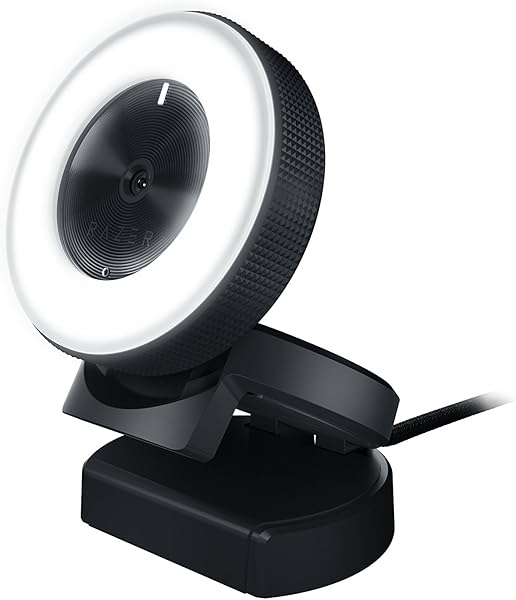
3. Razer Kiyo - Best Built-in Lighting
ASIN: B075N1BYWB - Amazon Link
The Razer Kiyo revolutionized streaming cameras by including a built-in ring light. This feature alone solves one of the biggest challenges for home streamers: proper lighting.
Standout features:
- 12 adjustable ring light levels: Perfect for any lighting condition
- 1080p 30fps or 720p 60fps: Flexibility for different streaming needs
- Advanced autofocus: Faster and more accurate than most competitors
- Gaming-focused design: Razer's signature aesthetic matches gaming setups
Ring light advantages:
- Even facial lighting: Eliminates harsh shadows
- Consistent appearance: Looks good regardless of room lighting
- No additional equipment: Saves money and desk space
- Easy adjustment: Ring rotates for brightness control
Gaming integration:
- Works with Razer Synapse for advanced settings
- Customizable light patterns (limited)
- Matches other Razer peripheral RGB lighting
- Optimized for gaming content creation
Considerations:
- Ring light creates distinctive catchlight in eyes (some love it, others don't)
- Slightly larger than standard webcams
- No 1080p 60fps option
Price: Check current price on Amazon | Razer at Best Buy
4. Razer Kiyo X - Best Compact Design
ASIN: B09FNX2PLL - Amazon Link
The Kiyo X strips away the ring light but maintains Razer's streaming focus in a more compact package. It's perfect for streamers who have existing lighting solutions but want Razer's software features and build quality.
Compact advantages:
- Smaller footprint: Takes up less space on crowded gaming desks
- Flexible mounting: Easier to position in tight setups
- Travel-friendly: Great for portable gaming/streaming setups
- Multiple frame rate options: 1080p 30fps or 720p 60fps
Software features:
- Razer Synapse integration: Advanced camera controls
- Custom settings profiles: Save different configurations for various games
- Auto-focus customization: Adjust focus speed and behavior
- Exposure and white balance control: Fine-tune image appearance
Best use cases:
- Streamers with existing lighting setups
- Portable gaming rigs
- Secondary camera for multi-cam setups
- Budget-conscious users who want Razer features
Price: Check current price on Amazon
5. Razer Kiyo Pro - Best Professional Features
ASIN: B08T1MWX6J - Amazon Link
The Kiyo Pro represents the current pinnacle of gaming-focused streaming cameras. With features typically found in much more expensive professional cameras, it's designed for serious content creators.
Professional features:
- 1080p 60fps: Smooth video for high-motion gaming content
- Adaptive light sensor: Automatically adjusts to changing lighting conditions
- HDR support: Better contrast and color accuracy
- Wide-angle lens with adjustable FOV: 103°, 90°, 80°, or 70°
- Superior low-light performance: Performs well in challenging lighting
Advanced capabilities:
- Uncompressed video: Better quality than compressed webcam feeds
- Professional autofocus: Fast and silent focusing
- Advanced noise reduction: Cleaner image in low light
- Multiple mounting options: Standard tripod mount included
Gaming-specific advantages:
- High frame rate capability: Matches high-refresh gaming monitors
- HDR gaming support: Better representation of HDR game content
- Adaptive lighting: Automatically compensates for changing RGB lighting
- Professional appearance: Looks appropriate in high-end gaming setups
Investment considerations:
- Premium pricing reflects professional features
- Requires more bandwidth for streaming
- May be overkill for casual streamers
- Best paired with other high-end streaming equipment
Price: Check current price on Amazon | Razer at Newegg
Camera Placement and Setup Guide
Optimal Positioning
Eye level placement: Camera should be at or slightly above eye level to avoid unflattering angles. This creates a more natural perspective and maintains viewer engagement.
Distance from subject: 2-3 feet is ideal. Too close creates distortion, too far reduces facial detail and emotional connection.
Angle considerations:
- Straight on: Most natural and professional appearance
- Slight downward angle: Can be flattering but avoid extreme angles
- Side angles: Only for specific creative purposes
Lighting Setup
Key lighting principles:
- Primary light source: Should come from in front of you, not behind
- Avoid harsh shadows: Use diffused lighting when possible
- Consistent lighting: Maintain same setup for brand consistency
- Color temperature: Match your room's lighting (warm or cool)
Budget lighting solutions:
- Desk lamps with diffusers: $20-30 for significant improvement
- LED ring lights: $30-60 for even, professional lighting
- Natural window light: Free but inconsistent
- Monitor backlighting: Provides subtle fill light
Software Configuration
OBS Studio settings:
- Resolution: Match your camera's optimal resolution (usually 1080p)
- Frame rate: 30fps for most streams, 60fps if bandwidth allows
- Filters: Add noise reduction and color correction as needed
- Audio: Use separate microphone instead of camera audio when possible
Streamlabs OBS:
- Similar settings to OBS Studio
- Integrated with streaming platforms
- Built-in camera filters and effects
- Easier setup for beginners
Gaming-Specific Camera Considerations
Stream Layout Integration
Face cam size:
- Large (1/4 screen): Good for reaction content and variety streaming
- Medium (1/6 screen): Balanced approach for most gaming streams
- Small (1/8 screen): Minimizes game obstruction for competitive gaming
Position on screen:
- Bottom right: Most common, doesn't interfere with most UI elements
- Bottom left: Good for games with right-side minimaps
- Top corners: Less common but works for specific game layouts
Game-Specific Setup
FPS games: Smaller face cam to maximize game visibility, higher frame rates preferred for smooth reactions
Strategy games: Larger face cam acceptable as game pace is slower, focus on clear audio for explanations
Horror games: Larger face cam showcases reactions, good lighting prevents dark footage
Variety streaming: Medium face cam, consistent lighting for different game types
Troubleshooting Common Issues
Performance Problems
High CPU usage:
- Reduce camera resolution in OBS
- Lower frame rate to 30fps
- Use hardware encoding when available
- Close unnecessary background applications
Bandwidth limitations:
- Reduce stream quality rather than camera quality
- Use variable bitrate streaming
- Monitor bandwidth usage during streams
- Consider dedicated upload bandwidth for streaming
Image Quality Issues
Blurry video:
- Clean camera lens
- Adjust autofocus settings
- Improve lighting conditions
- Check USB cable connection
Poor low-light performance:
- Add dedicated lighting
- Increase camera exposure (carefully)
- Use noise reduction software filters
- Position existing lights more effectively
Audio Sync Problems
Camera audio delay:
- Use OBS audio monitoring
- Add audio delay compensation
- Consider switching to dedicated microphone
- Check audio buffer settings
Future-Proofing Your Camera Investment
Technology Trends
AI-powered features: Future cameras will include more intelligent auto-framing, background removal, and lighting adjustment
Higher resolutions: While 4K streaming isn't mainstream yet, future cameras will handle it more efficiently
Better compression: New codecs will deliver better quality at lower bandwidth requirements
Integration features: Expect better integration with streaming software and gaming hardware
Upgrade Path Planning
Start with reliability: Choose proven models over cutting-edge features Focus on fundamentals: Good lighting and positioning matter more than camera specs Plan for growth: Consider how camera fits into future streaming setup expansion Budget for accessories: Factor in mounting, lighting, and audio equipment costs
Related Gaming Setup Articles
For a complete streaming setup:
- Best Gaming Monitor for Smart Setup 2026
- Best Smart Speaker for Gaming Room 2026
- Best Gaming Desk Setup Accessories
- Best Smart Light Bars for Monitor Gaming
Purchase Recommendations by Budget
Budget Option ($60-80): Logitech C920
Perfect for: New streamers, casual content creation, backup camera Buy on Amazon | Best Buy
Mid-Range ($80-120): Razer Kiyo
Perfect for: Dedicated streamers, users without existing lighting, Razer ecosystem fans Buy on Amazon | Best Buy
Premium ($150-200): Razer Kiyo Pro
Perfect for: Professional streamers, content creators, users wanting future-proof features Buy on Amazon | Newegg
Final Verdict
For most gaming streamers in 2026, the Logitech C920 remains the best value choice. Its proven reliability, excellent compatibility, and consistent performance make it the safe choice for anyone starting their streaming journey or looking for a dependable backup camera.
Streamers who struggle with lighting should strongly consider the Razer Kiyo. The built-in ring light eliminates the need for additional equipment and provides consistent, flattering illumination that makes any gaming setup look more professional.
For serious content creators ready to invest in premium features, the Razer Kiyo Pro offers professional-grade capabilities in a gaming-focused package. The 60fps capability, HDR support, and adaptive lighting make it worthy of high-end gaming setups.
Remember, the best camera is one that fits your specific needs, budget, and setup constraints. Focus on consistent lighting and proper positioning before worrying about premium camera features—these fundamentals will improve your stream quality more than any expensive equipment upgrade.
This article contains affiliate links. We earn a small commission from qualifying purchases at no additional cost to you.