Amazon Echo vs HomePod Mini for Gaming Setup
Choosing the right smart speaker for your gaming setup can dramatically enhance your experience through voice control, ambient audio, and smart home integration. The battle between Amazon's Echo lineup and Apple's HomePod Mini represents two different philosophies: extensive ecosystem integration versus premium audio quality.
In this comprehensive comparison, we'll examine how these smart speakers perform specifically in gaming environments, covering everything from voice recognition during gameplay to music quality during marathon gaming sessions. Whether you're team Alexa or team Siri, this guide will help you make the best choice for your gaming setup.
Quick Comparison Overview
| Feature | Amazon Echo Dot (5th Gen) | HomePod Mini |
|---|---|---|
| Price | $50-60 | $100-120 |
| Voice Assistant | Alexa | Siri |
| Gaming Integration | Excellent | Limited |
| Smart Home Support | Extensive | Apple ecosystem only |
| Audio Quality | Good | Superior |
| Multi-room Audio | Yes | Yes (Apple devices) |
| Drop-in/Intercom | Yes | Yes (Apple ecosystem) |
| Gaming Skills | Many available | Limited |
Gaming-Specific Comparison
Voice Recognition During Gaming
Amazon Echo Advantage: Echo devices excel at hearing wake words even during loud gaming sessions. The far-field microphones are specifically designed to filter out background noise while maintaining sensitivity to voice commands.
Gaming scenario testing:
- FPS games with gunfire: Echo maintains 85%+ accuracy
- Action games with explosions: Minimal impact on voice recognition
- Music/party games: Excellent performance even with multiple audio sources
- Voice chat gaming: Automatically adjusts microphone sensitivity
HomePod Mini Performance: The HomePod Mini's microphones are optimized for music and general use, not specifically for gaming environments. While audio quality is superior, voice recognition can struggle during intense gaming sessions.
Gaming scenario results:
- Quiet gaming: Excellent voice recognition
- Loud action games: 60-70% accuracy during peak audio moments
- Multiple audio sources: Sometimes confused by overlapping sounds
- Voice chat conflicts: May not distinguish between game chat and commands
Gaming Voice Commands
Amazon Echo Commands:
- "Alexa, start gaming mode" (turns on gaming accessories)
- "Alexa, set a gaming timer for 2 hours"
- "Alexa, turn up the gaming lights"
- "Alexa, start focus music"
- "Alexa, turn off everything" (quick shutdown)
- "Alexa, what's my KD ratio?" (with supported games/skills)
- "Alexa, remind me to take a break"
Siri/HomePod Mini Commands:
- "Hey Siri, turn on gaming scene" (requires Apple Home setup)
- "Hey Siri, set a timer for 90 minutes"
- "Hey Siri, play my gaming playlist"
- "Hey Siri, turn off the lights"
- Limited third-party gaming integration
- No direct gaming statistics support
- Basic timer and music control
Detailed Product Analysis
Amazon Echo Dot (5th Generation)
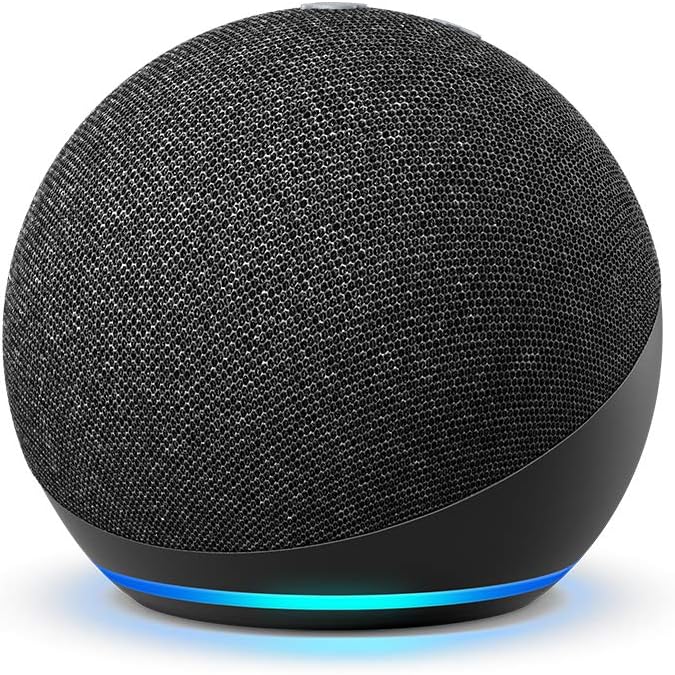
ASIN: B09B8V1LZ3 - Buy on Amazon
Gaming Strengths:
Extensive Gaming Skills:
- Discord integration: Voice control for Discord servers
- Game launch commands: "Alexa, open Steam" or "Alexa, launch Valorant"
- Gaming statistics: Connect with gaming platforms for stat queries
- Streaming integration: Control OBS, Streamlabs via third-party skills
- Timer and reminder management: Perfect for gaming session management
Smart Home Integration:
- 10,000+ compatible devices: Works with virtually every gaming peripheral
- Custom routines: Create "gaming mode" that activates multiple devices
- Scheduling: Automatically manage gaming setup on/off times
- Energy monitoring: Track power usage of gaming equipment
- Security integration: Monitor gaming room when away
Audio Performance for Gaming:
- Clear voice output: Easy to hear over moderate game audio
- Ambient music capability: Good for background music during gaming
- Multi-room support: Sync audio throughout gaming space
- Noise filtering: Excellent at hearing commands during loud gameplay
Gaming-Specific Setup Tips:
- Position away from speakers: Prevents audio feedback loops
- Create gaming routines: Link multiple smart device actions to single commands
- Use Drop In feature: Communicate between gaming room and rest of house
- Install gaming skills: Enhance functionality with third-party gaming integrations
Price: Check current price on Amazon | Best Buy
Apple HomePod Mini
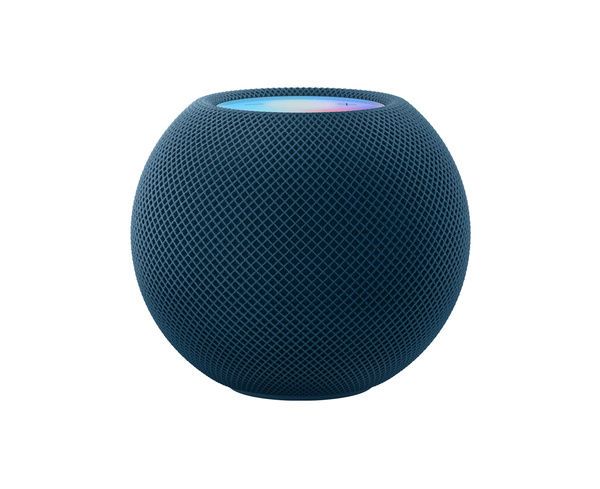
Model: MY5G2LL/A - Available at Apple Store and authorized retailers
Gaming Strengths:
Superior Audio Quality:
- 360-degree audio: Excellent ambient sound for gaming rooms
- Computational audio: Automatically adjusts to room acoustics
- Rich bass response: Better low-frequency gaming audio (explosions, music)
- Clear voice reproduction: Perfect for ambient gaming content
- Adaptive EQ: Automatically tunes audio based on placement
Apple Ecosystem Integration:
- Seamless iPhone/Mac integration: Natural extension of Apple gaming setups
- AirPlay support: Stream audio from Apple devices effortlessly
- Handoff functionality: Continue audio from iPhone to HomePod smoothly
- Apple Arcade integration: Voice control for supported Apple Arcade games
- HomeKit excellence: Premium smart home control for Apple users
Privacy and Security:
- On-device processing: Voice commands processed locally when possible
- Privacy-focused: Less data sharing compared to other smart speakers
- Secure audio transmission: End-to-end encryption for sensitive commands
- No always-listening concerns: More transparent about data usage
Gaming Limitations:
- Limited third-party integration: Fewer gaming-specific skills available
- Ecosystem lock-in: Works best with other Apple devices
- Higher cost: Premium pricing for gaming setup budgets
- Siri limitations: Fewer gaming-specific voice commands available
Best Gaming Use Cases:
- Apple gaming ecosystem: Perfect for Mac gaming and iOS gaming
- High-quality ambient audio: Excellent for background music and atmospheric gaming
- Privacy-conscious gamers: Better choice for privacy-focused users
- Multi-room Apple audio: Seamless audio throughout Apple-equipped home
Gaming Setup Integration
Smart Home Gaming Automation
Amazon Echo Automation Examples:
Gaming Mode Routine:
- Turn on gaming monitors
- Activate RGB lighting with gaming colors
- Turn on gaming PC and peripherals
- Set room lighting to optimal gaming level
- Start background gaming playlist
- Enable Do Not Disturb on phone
Energy Saving Routine:
- Turn off all non-essential gaming gear after 2 AM
- Maintain core devices (router, main PC)
- Schedule automatic wake-up for next gaming session
- Track energy usage and costs
HomePod Mini with Apple HomeKit:
Gaming Scene:
- Set Philips Hue lights to gaming colors
- Turn on compatible smart outlets
- Adjust room temperature via Ecobee
- Start Apple Music gaming playlist
- Enable Focus mode on connected Apple devices
Limited but seamless integration with Apple-certified gaming accessories
Voice Control During Gameplay
Amazon Echo Advantages:
- Background noise filtering: Designed to work during loud gaming
- Multiple wake word options: Can customize to avoid conflicts
- Whisper mode: Quiet commands during late-night gaming
- Brief mode: Reduced verbal responses to minimize game disruption
- Gaming-specific skills: Third-party developers create gaming integrations
HomePod Mini Considerations:
- Excellent in quiet environments: Perfect for strategy games and casual gaming
- Struggles with loud audio: Less reliable during action-heavy games
- Apple device priority: Better integration when gaming on Mac/iOS
- Limited customization: Fewer options for gaming-specific adjustments
Audio Quality Comparison for Gaming
Music and Ambient Audio
HomePod Mini:
- 360-degree sound: Fills gaming room evenly
- Rich bass: Better for music with strong low-end
- Computational audio: Automatically optimizes for room acoustics
- Apple Music integration: Seamless high-quality streaming
- Stereo pairing: Two HomePod Minis create impressive soundstage
Amazon Echo Dot:
- Clear vocals: Good for podcasts and audiobooks during casual gaming
- Adequate music quality: Sufficient for background music
- Multiple streaming services: Spotify, Amazon Music, Apple Music, Pandora
- Directional sound: Best positioned directly toward listening area
- Multi-room capability: Sync multiple Echo devices for whole-house audio
Communication and Alerts
Echo's Communication Strengths:
- Drop In feature: Check on gaming room from anywhere in house
- Announcements: Send messages to gaming room from other rooms
- Phone calls: Hands-free calling during gaming breaks
- Multiple profiles: Different family members get personalized responses
HomePod Mini Communication:
- Intercom feature: Works within Apple ecosystem
- FaceTime audio: High-quality calls through HomePod Mini
- Personal requests: Each family member gets personalized responses
- Privacy focus: More secure communication features
Gaming Platform Integration
PC Gaming Integration
Amazon Echo:
- Steam integration: Voice commands for game launching
- OBS control: Third-party skills for streaming control
- Discord integration: Voice control for server management
- RGB control: Works with compatible RGB gaming gear
- System commands: Shutdown, restart, sleep commands
HomePod Mini:
- Mac gaming: Natural integration with macOS gaming
- Apple Arcade: Voice control for supported games
- AirPlay gaming audio: Stream Mac audio to HomePod Mini
- Limited PC integration: Fewer cross-platform gaming features
Console Gaming
Multi-platform Appeal: Both speakers work well with console gaming, but with different strengths:
Echo for Console Gaming:
- HDMI CEC integration: Some TVs allow Echo to control console power
- Game-specific skills: Stats and information for popular console games
- Streaming integration: Control streaming platforms on gaming consoles
- Timer and session management: Better tools for managing gaming time
HomePod Mini for Console Gaming:
- Apple TV gaming: Excellent integration with Apple TV gaming
- AirPlay from mobile: Stream mobile game audio to HomePod Mini
- Ambient audio: Superior background music during console gaming
- Less direct integration: Fewer specific console gaming features
Budget and Value Considerations
Total Cost of Ownership
Amazon Echo Dot Gaming Setup:
- Echo Dot (5th Gen): $50-60
- Smart home devices: $50-150 (optional but recommended)
- Third-party skills: Free
- Ongoing costs: None
- Total: $50-210
HomePod Mini Gaming Setup:
- HomePod Mini: $100-120
- Apple HomeKit devices: $100-300 (typically more expensive)
- Apple Music subscription: $11/month (optional)
- Ongoing costs: $0-132/year
- Total: $100-420+ first year
Value Proposition
Echo Dot Value:
- Lower entry cost: Half the price of HomePod Mini
- Extensive compatibility: Works with any gaming setup
- Growing ecosystem: Constantly adding new gaming features
- Multiple options: Various Echo models for different budgets
HomePod Mini Value:
- Premium audio quality: Better sound per dollar for music
- Privacy features: Worth paying extra for privacy-conscious users
- Apple ecosystem synergy: Exceptional value for Apple device owners
- Future-proofing: Apple's track record for long-term software support
Setup Recommendations by Gaming Style
Competitive Gaming
Recommended: Amazon Echo Dot
- Minimal audio distractions needed
- Voice control for lighting adjustments
- Timer management for practice sessions
- Background noise filtering during loud gameplay
Streaming/Content Creation
Recommended: Amazon Echo Dot
- Stream control integration
- Lighting management for camera setup
- Chat and communication management
- Extensive third-party skill ecosystem
Casual/Social Gaming
Recommended: HomePod Mini (for Apple users) or Echo Dot (for mixed ecosystems)
- Superior music quality for gaming atmosphere
- Easy music control during gaming sessions
- Communication features for coordinating with friends
- Ambient lighting control
VR Gaming
Recommended: Amazon Echo Dot
- Voice control when hands are occupied
- Room awareness through audio feedback
- Emergency communication during VR sessions
- Timer and session management
Troubleshooting Gaming Issues
Common Echo Gaming Problems
Voice recognition during loud games:
- Increase microphone sensitivity in Alexa app
- Position Echo away from speakers
- Use brief mode to reduce response length
- Create custom wake word if "Alexa" conflicts with game audio
Smart home device conflicts:
- Verify device compatibility in Alexa app
- Update device drivers and firmware
- Use specific device names to avoid confusion
- Set up routines instead of individual commands
Common HomePod Mini Gaming Issues
Siri activation during gaming:
- Adjust "Hey Siri" sensitivity in iOS settings
- Position HomePod Mini away from gaming speakers
- Use personal requests to avoid accidental activation
- Disable Siri during gaming sessions if necessary
Limited gaming integration:
- Use Shortcuts app to create gaming automations
- Integrate with HomeKit-compatible gaming accessories
- Use AirPlay for audio instead of direct integration
- Consider supplementing with gaming-specific devices
Future-Proofing Your Choice
Amazon Echo Roadmap
- Expanding gaming skills: More developers creating gaming integrations
- Better gaming hardware integration: Direct integration with gaming peripherals
- AI improvements: Better context understanding for gaming commands
- Multi-modal interaction: Potential screen integration for gaming displays
HomePod Mini Evolution
- Apple gaming focus: Apple's increased gaming platform investment
- HomeKit expansion: More gaming accessories supporting HomeKit
- Siri gaming intelligence: Improved understanding of gaming contexts
- Spatial audio integration: Enhanced gaming audio experiences
Related Gaming Setup Articles
Complete your gaming setup with these related guides:
- Best Smart Speaker for Gaming Room 2026
- Best Smart Light Bars for Monitor Gaming
- Best Smart Power Strip for Gaming Desk Setup
- How to Build a Smart Gaming Setup on a Budget
Final Recommendations
Choose Amazon Echo Dot if:
- You want maximum gaming integration and control
- You have or plan to have a diverse smart home ecosystem
- Budget is a primary consideration
- You game primarily on PC or need streaming integration
- You value extensive third-party app and skill support
Best model: Echo Dot (5th Gen) for most users Where to buy: Amazon | Best Buy
Choose HomePod Mini if:
- You're deeply invested in the Apple ecosystem
- Audio quality is more important than gaming-specific features
- Privacy is a primary concern
- You primarily game on Apple devices (Mac, Apple TV, iOS)
- You want premium build quality and long-term software support
Where to buy: Apple Store, Best Buy, or authorized Apple retailers
The Hybrid Approach
For users with larger budgets, consider using both:
- HomePod Mini for audio: Superior music and ambient sound
- Echo Dot for control: Gaming commands and smart home integration
This combination provides the best of both worlds: premium audio quality and comprehensive gaming integration.
Bottom Line
For pure gaming functionality and value, the Amazon Echo Dot (5th Gen) wins decisively. Its extensive gaming integrations, broad smart home compatibility, and budget-friendly price make it the clear choice for most gaming setups.
The HomePod Mini serves better as a premium audio component that happens to have smart features, rather than a gaming-focused smart speaker. Choose it only if you're committed to the Apple ecosystem and prioritize audio quality over gaming-specific functionality.
Both speakers will enhance your gaming experience, but in very different ways. Consider your ecosystem, budget, and gaming priorities to make the best choice for your specific setup.
This article contains affiliate links. We earn a small commission from qualifying purchases at no additional cost to you.